
Offline mode
This device only: your records never leave the phone and no internet is needed. Back up with a JSON export whenever you like.
No cloud · JSON backupWorks without signal · syncs when you’re back online
StructurePrime puts attendance, production, concrete, cash, subcontractors and inspection records into one app built for the field. Photos carry their GPS position and time, and evidence can be digitally signed — so a record shows where and when it was made.

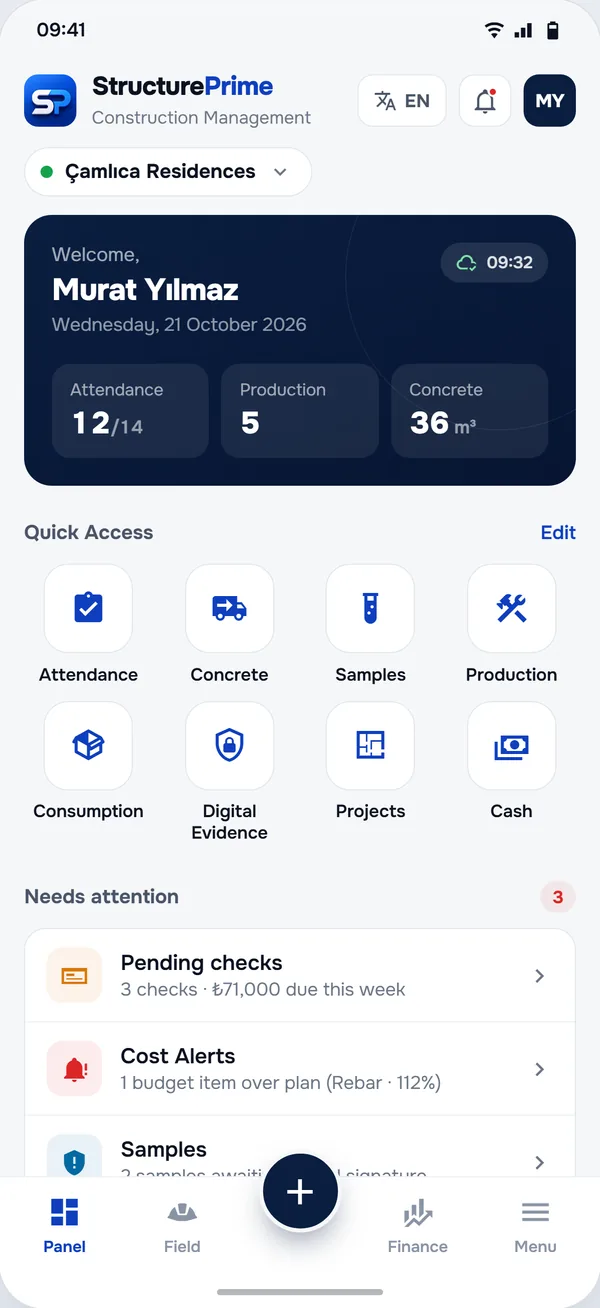
Built for
56 modules
From the daily roll call to the subcontractor contract. Open a group to see its modules — each one has its own page with what it records and why.
Sites, buildings and blocks, subcontractors, crews, drawings, utility connections and accounts, specialist works.
Attendance, work progress, internal transfers and material usage — the entries made every day.
Cash book, payables and receivables, cheques, fees, budget vs actual, cash flow forecast, cost alerts and profitability.
Concrete pours, goods received, supply list, suppliers, purchase requests, parcels, vehicles, rented equipment and a QR warehouse.
Building permits, contracts with progress payments, site handover records and the key documents.
Samples with 7/28-day results, core testing, labs, the inspection firm, quality control, concealed works and signed evidence.
Safety officers and agreements, accident reports and the per-worker list of missing documents.
Reports, the attendance report, a management panel for all sites, activity and equipment costs, reminders, meetings, calls and field reference.
Offline-first
Every record is saved on the phone first. Choose Offline mode and your records never leave the device — the app fetches its licence with an anonymous device ID. Choose Online mode and your records sync to StructurePrime Cloud — entries made without signal wait on the phone and go up when the connection is back.
Records live in the app’s private storage on the device; a PIN keeps the app closed to others using the phone.
Export all your records as one JSON file whenever you like, and restore them on another phone.
In online mode, changes go up a few seconds after you save and again whenever the connection returns. Photos can wait for Wi-Fi.
In a team, each member sees only the areas and sites of their role; the server checks every request.
This device only: your records never leave the phone and no internet is needed. Back up with a JSON export whenever you like.
No cloud · JSON backupCloud sync with your StructurePrime account, so your records are on every phone you sign in on. With Premium: team members with roles, QR invites, unlimited devices and 90-day history.
Cloud sync · teams with PremiumChoose on first launch and change it any time in Settings. Switching to online keeps your records and uploads them.
C30/37 · 150×150

9f2c7a1e4b0d3f8a6c2e5b7d1a9f0c4e8b3d6a2f7c1e9b4d0a5f3c8e2b7d1a6fDigital evidence
Photos are saved with their GPS position and time. To sign a record, the app computes its SHA-256 fingerprint on the phone; only that fingerprint goes to the StructurePrime server, which signs it with its RSA-2048 key and the server time. The signature can be checked in the app later — even offline.
The SHA-256 hash is computed on the device. The photo itself is never sent for signing.
GPS position and time are part of the record; the server time is part of the signature.
Verification uses the published public key and works without signal. Change one character and the check fails.
A signed record can no longer be edited. Digital Evidence, Samples, Core Testing and Concealed Works Records can be signed.
Signing needs a signed-in account, online mode and Premium. No signal? The record waits as “awaiting signature” and is signed as soon as the app is online again.
How the Digital Evidence module worksWeb panel · coming soon
A read-only web panel for the office is being built on the same cloud workspace: sample results, finance summaries, attendance and team roles in a desktop browser. It is not available yet — until it opens, everything runs in the app on phones and tablets.
How it works
Start the 30-day free trial with your StructurePrime account, then add the site, its blocks and the crews working today. Moving to a new phone? Import your JSON backup.
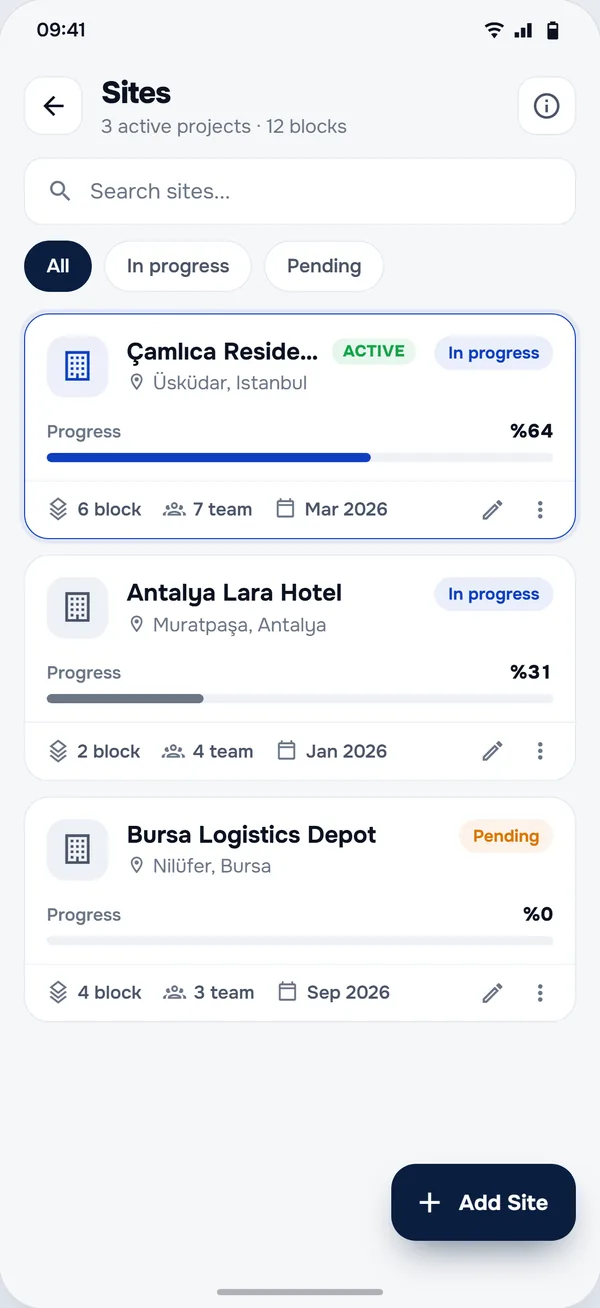
The + button opens quick entry from any screen: attendance, cash, concrete, production, samples and evidence — on the active site.
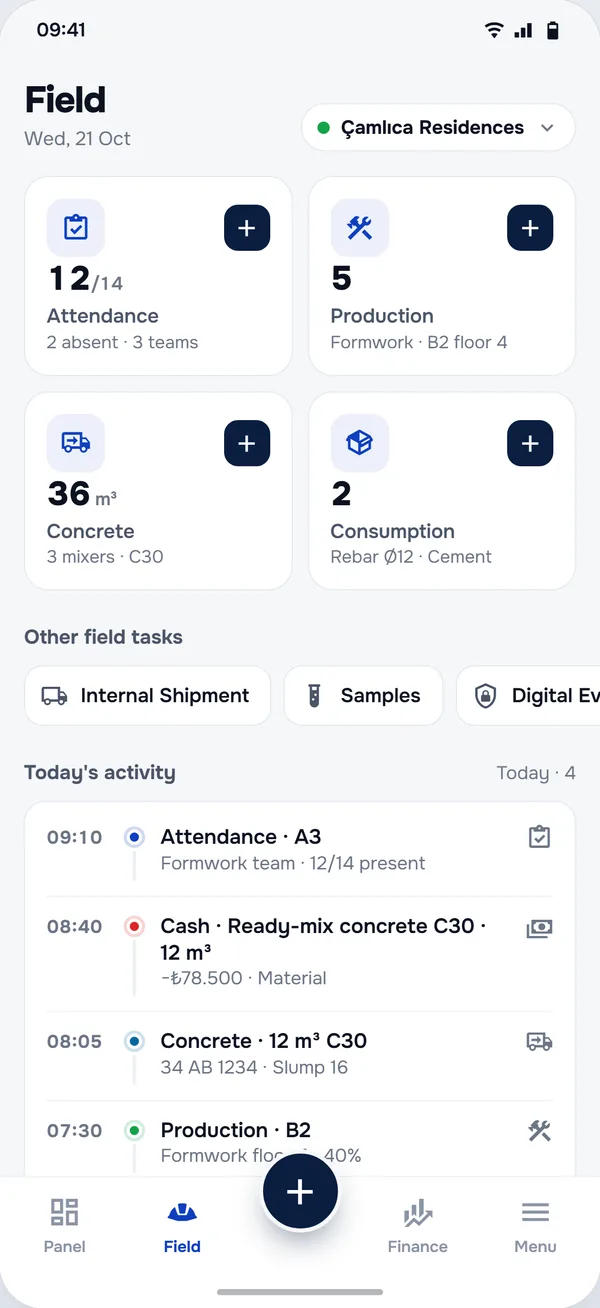
Export PDF and CSV reports with Premium, or switch to online mode and invite your team with a QR code.
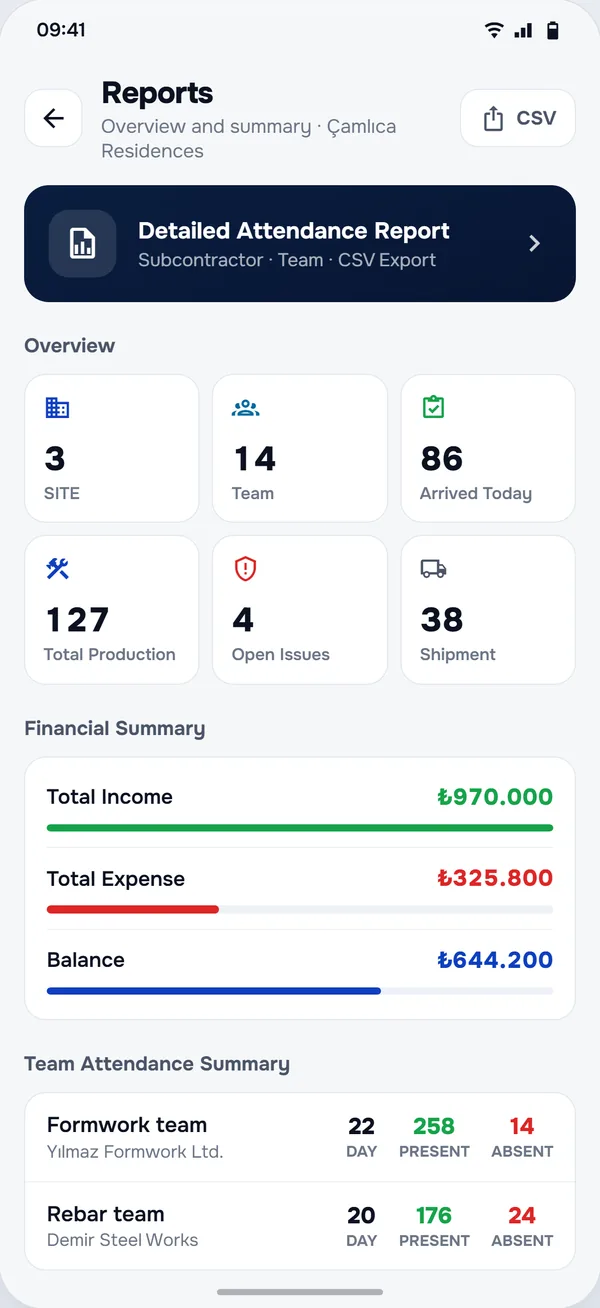
In the field
Typical days, told through the modules that handle them — not customer stories.
Residential block · pour day
The first truck arrives at 07:40. Plate, m³, concrete class and slump go into Concrete Pours before it leaves. The cubes taken from the pour get a sample record with photos and GPS, and the 7- and 28-day results are added to the same sample when the lab reports them.
Small contractor · three sites
With the team in online mode (Premium), foremen log cash on site with a photo of the receipt, and the owner follows each site’s balance and this week’s cheques on their own phone. In the evening the Management Panel puts all three sites side by side.
Brick delivery · damaged pallets
Half a pallet of bricks arrives broken. The delivery goes into Goods Received and the photos into Digital Evidence, with GPS position and time; once signed, the record can no longer be edited. The claim to the supplier starts from a record, not from memory.

“Technology that doesn’t make the job easier is just one more thing to carry. We built StructurePrime from inside the job site, for the people who work on it.”
Security & data
StructurePrime was built offline-first for a reason: the site owns its records. In online mode they sync to StructurePrime Cloud, scoped by role and site, and access can be taken back at any time.
Records live in the app’s private storage, protected by the operating system. A PIN keeps the app closed on a shared phone.
For a digital signature only the SHA-256 fingerprint goes to the server. The photo stays with you.
Offline mode does not send your records anywhere. The app has no advertising or analytics SDKs.
Owner, project manager, accountant, site chief, foreman, timekeeper and more — each sees only its areas, and the server checks every request.
Export all your records as one JSON file at any time and restore them on another phone.
In online mode every change is kept with who made it and when — 14 days without Premium, 90 with Premium — and every workspace that changed is backed up each night, encrypted.
The timekeeper sees attendance, the foreman sees production and progress payments, the accountant sees the money. You decide who sees which sites, and you can take access back at any time. Team members with roles come with Premium.
| Site | Attendance | Production | Materials & store | Finance | Contracts & payments | Permits & documents | Inspection & quality | Health & safety | Meetings & calls | |
|---|---|---|---|---|---|---|---|---|---|---|
| Site admin | Yes | Yes | Yes | Yes | Yes | Yes | Yes | Yes | Yes | Yes |
| Owner | Yes | Yes | Yes | Yes | Yes | Yes | Yes | Yes | Yes | Yes |
| Project manager | Yes | Yes | Yes | Yes | Yes | Yes | Yes | Yes | Yes | Yes |
| Accountant | Yes | Yes | Yes | Yes | Yes | Yes | Yes | Yes | Yes | Yes |
| Site chief | Yes | Yes | Yes | Yes | No | No | Yes | Yes | Yes | Yes |
| Architect / engineer | Yes | Yes | Yes | Yes | No | Yes | Yes | Yes | Yes | Yes |
| Storekeeper | Yes | Yes | Yes | Yes | No | No | Yes | Yes | Yes | Yes |
| Foreman | No | Yes | Yes | No | No | Yes | No | No | No | No |
| Timekeeper | No | Yes | No | No | No | No | No | No | No | No |
Why not paper or a chat group
| Paper & spreadsheets | Chat groups | StructurePrime | |
|---|---|---|---|
| Who recorded it, when and where | Whoever wrote it, if they signed | Sender and time, no structure | Time and place on the record; the author in online mode |
| No signal on site | Paper works; shared files don’t | Messages wait to be sent | Works offline; syncs later in online mode |
| Photo kept with the record | In a separate folder | Lost in the scroll | Attached to the record, signable as evidence |
| Totals and balances | Added up by hand | Collected by someone later | Calculated as you record |
| 28-day result next to the pour | In the lab file | A photo of the lab sheet | On the same sample record |
| Who sees what | Whoever has the file | Everyone in the group | Nine roles, per site |
What’s new
The first release under the StructurePrime name (formerly SantiyePro), rebuilt around how a site works.
Five tabs: Panel · Field · Quick entry · Finance · Menu. Cloud, backup, settings and license are under Menu.
Choose how you work on first launch: Offline (this device only) or Online (cloud sync). Change it any time in Settings.
Cloud sync with a StructurePrime account: sign in with Google, Apple, LinkedIn or a code sent by e-mail.
Team workspaces: invite people with a QR code or a link and give each one of nine roles, per site (Premium).
A Finance tab with the cash balance, net receivables and pending cheques, next to budget, cash flow, profitability and cost alerts.
Digital signatures by the StructurePrime server (RSA-2048 and server time), checked on the phone even offline.
Dark theme, right-to-left layouts and 22 languages.
Pricing
Start a 30-day free trial of Premium in the app: every module, unlimited sites and records. Google Play charges nothing during the trial; after it, Premium continues weekly, monthly or yearly in your local currency. Cancel any time.
30 days free
Sign in with your StructurePrime account in the app and start the trial on Google Play. Cancel before day 30 and you pay nothing.
Local price
Weekly, monthly or yearly — shown in Google Play in your currency
Premium belongs to your StructurePrime account: sign in in the app to start the trial or subscribe. Without a trial or subscription the app opens read-only. Managed in Google Play — cancel any time. It renews automatically at the end of each period.
Get it on Google PlayQuestions
Yes. Premium starts with a 30-day free trial in the app: every module, unlimited sites and records — enough to run it on real work. Google Play charges nothing during the trial, and you can cancel before it ends. Without a trial or subscription the app opens read-only: you can look around and load the demo site, but not add or change records.
Premium is a Google Play subscription — weekly, monthly or yearly. Google Play shows the price in your local currency before you pay, and you can cancel any time in your Google Play settings. Premium belongs to your StructurePrime account, so you sign in before subscribing.
Yes. In offline mode everything stays on the phone. The app connects to our server to get its licence — it sends an anonymous device ID, no personal information — and keeps the licence on the phone; while there is an internet connection it checks the licence about once a day. In online mode the app keeps working without signal: records are queued on the phone and sent when the connection comes back.
In offline mode, only on your phone — you back it up with a JSON export. In online mode, on your phone and, synchronised, in StructurePrime Cloud, so your other phones — and, with Premium, your team — see the same records. You choose which kinds of data each device uploads.
You do. In offline mode they never leave your phone. In online mode we store them only to sync and back them up; we don’t sell data or show ads, and you can export everything as a JSON file at any time or delete your account in the app.
Yes — in online mode, with Premium. Invite people with a QR code or a link and give each one a role: site admin, owner, project manager, accountant, site chief, architect/engineer, storekeeper, foreman or timekeeper. Each role sees only its own areas, and you choose which sites they see.
Photos are saved with GPS location and time. The app computes a SHA-256 fingerprint of the record; only that fingerprint is sent to the StructurePrime server, which signs it with its RSA key and the server time. Signed records cannot be edited, and the signature can be checked on the device, even offline. Digital signatures are part of Premium.
Not yet. A read-only web panel on the same cloud workspace is being built. Until it opens, everything runs in the app on Android phones and tablets.
Android 8.0 or later, on phones and tablets. Install it from Google Play, or get the APK from our download page.
22 languages, from Turkish and English to Arabic, Chinese, Hindi and Hebrew. Each phone can use its own language.
Offline: export a JSON backup on the old phone and import it on the new one. Online: sign in on the new phone and your sites sync down.
Not answered here? Open a support ticket
Start with a 30-day free trial — Google Play charges nothing until it ends. In 22 languages, from English and Turkish to Arabic and Hindi.
